
In This Article
Introduction: Why the Types of Trackers Matter More Than the Brand
Picture this: it’s 7:42 a.m., you’re already late, and your keys have vanished into the same black hole that ate last week’s AirPods case. 🔑 That’s the moment most people start shopping for a tracker — and also the moment they make the most expensive mistake. They buy the wrong type. Understanding the types of trackers before you click “add to cart” is what separates a $30 fix from a $300-a-year subscription you didn’t need, so this guide starts with the categories, not the logos.
Here’s the short version. Some trackers are tiny Bluetooth tags that borrow millions of strangers’ phones to report where your stuff is. Others carry their own GPS chip and cellular modem, so they can report live location from almost anywhere — for a monthly fee. And a third group is purpose-built for pets, adding geofences, activity data, and even vital-sign monitoring on top of GPS.
Each of these different types of trackers solves a different problem. A Bluetooth tag is brilliant for keys and luggage but nearly useless for a dog running through a forest. A cellular GPS unit is the right call for a work trailer, yet overkill for a wallet. And your phone matters, too: an iPhone, a Samsung Galaxy, and a generic Android phone each lock you into (or out of) specific finding networks.
In this 2026 guide, you’ll get a plain-English breakdown of how each category works, a side-by-side comparison of seven real models sold on Amazon, honest subscription math, the safety rules most buyers never hear about, and practical setup advice that product listings skip. ⚡ No fake test stories, no hype — just specs, real review trends, and clear reasoning so you can choose with confidence.
What Are the Types of Trackers?
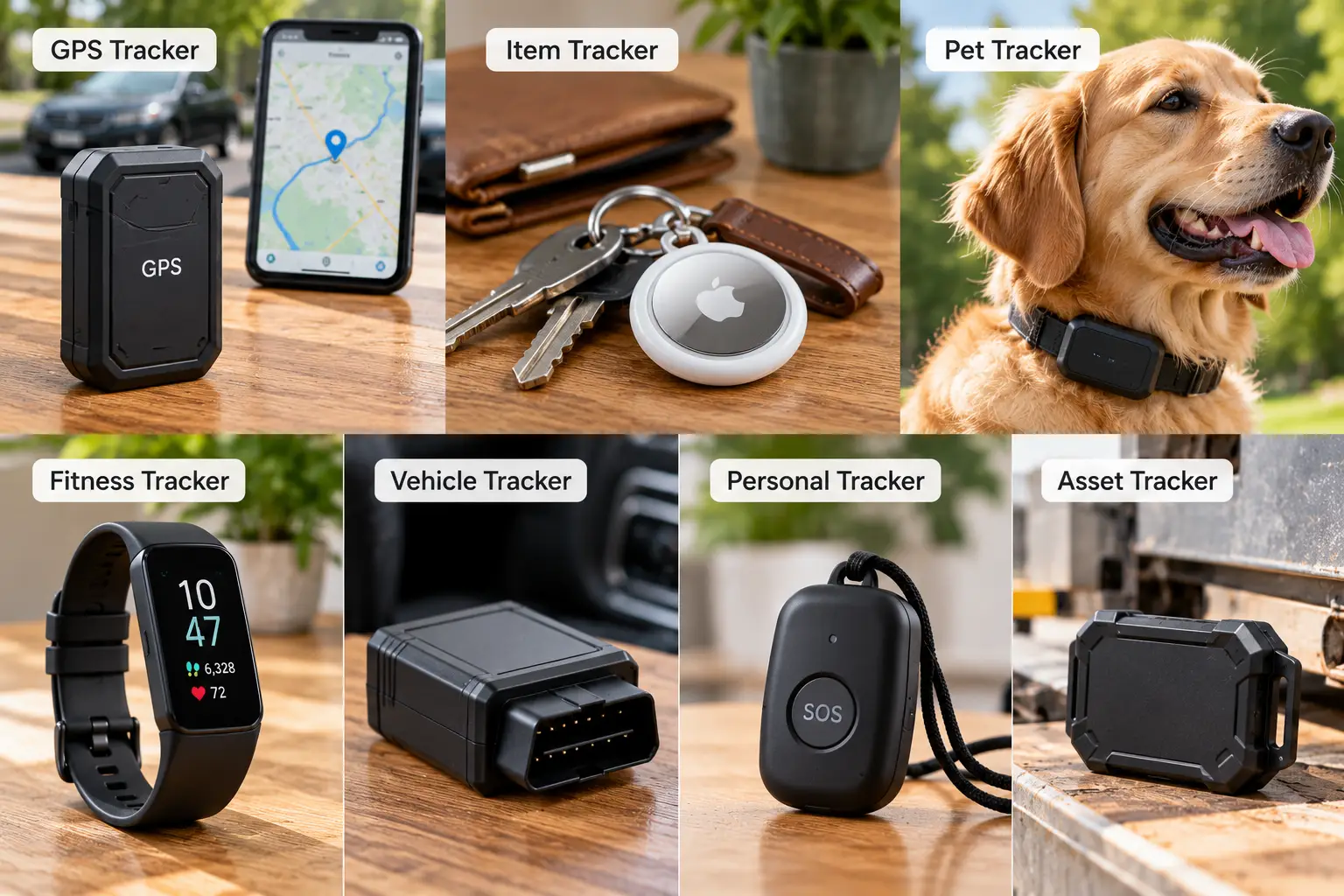
The main types of trackers are Bluetooth item trackers, which report location through a crowdsourced network of nearby phones; cellular GPS trackers, which use satellites plus a SIM-based data plan to send live location; and specialized pet GPS trackers, which add geofencing and health monitoring. Each trades cost, range, and battery life differently.
That’s the snippet answer. Now let’s unpack what it means for you.
Bluetooth item trackers 📡
These are the coin- or card-shaped tags you clip to keys, toss in luggage, or slide into a wallet. They don’t have GPS at all. Instead, they broadcast a low-energy Bluetooth signal that any compatible phone nearby can pick up and relay anonymously — Apple’s Find My network, Google’s Find Hub, Samsung’s SmartThings Find, or the Tile network run by Life360. The upshot: no monthly fee, a battery that lasts about a year or more, and excellent coverage in cities. The catch: in a remote canyon with no phones around, you’ll only see the last place someone passed it.
Cellular GPS trackers 🛰️
A true GPS tracking unit calculates its own position from satellites, then pushes that position to your phone over a cellular network (usually 4G LTE or LTE-M). That’s why it works on a car parked 300 miles away or a trailer in an empty lot. In exchange, you pay for a data plan, and the battery is measured in weeks or months rather than years.
Pet GPS trackers 🐕
These are cellular GPS trackers tuned for animals: lightweight, collar-mounted, waterproof, with virtual fences that alert you the moment your dog leaves the yard. Many now add activity, sleep, and even heart- and respiratory-rate monitoring.
Other secondary categories — OBD-II car plug-ins, hardwired fleet units, and kids’ smartwatches — are variations on the cellular GPS theme, and the analysis below applies to them too.
Quick Comparison: 7 Trackers at a Glance
Before the deep dive, here’s the whole lineup on one screen. Prices are approximate ranges at the time of writing — check the current price on Amazon, since tracker deals move fast.
| Tracker | Type | Finding network | Battery | Subscription | Price range | Best for |
|---|---|---|---|---|---|---|
| Apple AirTag (2nd generation) | Bluetooth + UWB | Apple Find My | 1+ year, CR2032 | None | Under $30 | iPhone owners |
| Samsung Galaxy SmartTag2 | Bluetooth + UWB | SmartThings Find | Up to 500 days, CR2032 | None | Around $30 | Galaxy phone owners |
| Pebblebee Clip 5 | Bluetooth | Find My or Find Hub | Up to 12 months, rechargeable | None for finding | Around $35 | Mixed iPhone/Android homes |
| Tile Pro (2024) | Bluetooth | Tile / Life360 | About 1 year, CR2032 | Optional | $30–$40 | Life360 families |
| Tracki Pro | Cellular GPS | 4G LTE, global SIM | Months (mode-dependent) | Required | Under $40 + plan | Long-term asset tracking |
| LandAirSea 54 | Cellular GPS | 4G LTE | Weeks to months | Required | $30–$40 + plan | Cars, trailers, equipment |
| Tractive DOG 6 | Pet GPS | GPS + cellular | Up to 14 days | Required | $50–$80 + plan | Dogs that roam |
Looking at the table, the dividing line is obvious: the four Bluetooth tags cost about the same and never bill you monthly, while the three GPS units are cheap upfront but expensive to own. The real decision among the Bluetooth options is your phone ecosystem — Apple AirTag (2nd generation) for iPhone, Samsung Galaxy SmartTag2 for Galaxy, Pebblebee Clip 5 if your household is split. Among the GPS units, Tractive DOG 6 wins for pets, while Tracki Pro and LandAirSea 54 compete on battery life versus mounting convenience.
💬 One click helps other shoppers make an informed choice too! 😊
Top 7 Trackers in 2026: Expert Analysis by Type
The seven picks below span every major type of tracker and every major phone ecosystem, from sub-$30 Bluetooth tags to subscription GPS units. Each one is real, currently sold to US buyers, and analyzed on its spec sheet plus the review trends we could verify.
1. Apple AirTag (2nd generation) — best finder for iPhone owners
If you carry an iPhone, the Apple AirTag (2nd generation) is the default to beat, and its 2026 refresh widened that lead. Apple introduced it in January 2026 with a second-generation Ultra Wideband (UWB) chip, and the company says Precision Finding now guides you from up to 50% farther away. In practice, that means the on-screen arrow kicks in from the next room instead of only when you’re standing over the couch cushions. The speaker is also 50% louder, which matters more than it sounds when keys are buried in a coat pocket.
Based on the specs, this is the right pick for anyone fully in Apple’s world: it reports through the enormous Find My network, it’s IP67 water and dust resistant, and the CR2032 coin cell lasts over a year and is user-replaceable. New owners with an Apple Watch Series 9 or later can even run Precision Finding from the wrist. Note that the expanded Precision Finding requires an iPhone 15 or later (excluding the 16e models).
Review coverage consistently treats it as the obvious buy for new iPhone users, while advising owners of a working first-gen AirTag not to rush an upgrade. The most common complaint hasn’t changed since 2021: there’s still no built-in key-ring hole.
Pros:
- ✅ Taps the largest crowdsourced finding network available
- ✅ Longer-range Precision Finding, now on Apple Watch too
- ✅ Louder speaker makes buried items easier to hear
Cons:
- ❌ Useless for Android phone owners
- ❌ Needs a separate holder to attach to keys
Priced under $30 for one (about $100 for a four-pack), it’s the best value per dollar for iPhone households.
2. Samsung Galaxy SmartTag2 — longest battery among coin-cell tags
The Samsung Galaxy SmartTag2 is to Galaxy phones what AirTag is to iPhones, with one standout spec: battery life rated up to 500 days, and up to 40% more in Power Saving Mode. That’s potentially two years between battery swaps for a set of spare keys.
Under the hood, it uses Bluetooth LE 5.3 with a rated range up to about 120 meters (roughly 390 feet), plus UWB. On a UWB-equipped Galaxy phone, Compass View points you toward the tag the way Precision Finding does on iPhone. The oblong shape has a built-in key-ring loop — a small design choice that saves you from buying a holder. It’s IP67 rated, and Lost Mode lets anyone tap it with an NFC-capable phone to see your contact details.
Here’s what to weigh: it requires a Galaxy device running Android 9 or later and SmartThings Find. Pixel or Motorola owners should skip it. German outlet Computer Bild praised the quick setup and waterproof housing but flagged the Samsung-only compatibility and low scratch resistance — consistent with broader owner feedback.
Pros:
- ✅ Exceptional battery life for a coin-cell tracker
- ✅ Compass View precision finding on UWB Galaxy phones
- ✅ Built-in loop attaches directly to key rings
Cons:
- ❌ Works only with Samsung Galaxy devices
- ❌ Plastic shell scuffs easily in pockets
At around $30, it’s a strong value — but only if a Galaxy phone is in your pocket.
3. Pebblebee Clip 5 — best rechargeable, cross-platform pick
The Pebblebee Clip 5 solves the mixed-household headache: it works with Apple Find My or Google’s Find Hub, so one product line serves both the iPhone parent and the Android teen. It can connect to only one network at a time, though, so pick at setup.
The battery is rechargeable over USB-C and rated up to 12 months per charge — no coin cells to buy, and no child-safety worry about a loose CR2032 (more on that in the safety section). Pebblebee lists a 97 dB buzzer, bright LEDs, IP66 protection, and up to 500 feet of Bluetooth range. Extras include Phone Finder (double-press to ring your phone), a Link QR code so a finder can contact you even if the battery is dead, and an Alert personal-safety mode that notifies trusted contacts.
On paper, the trade-off is the missing UWB chip: you get loud sound and lights for close-range finding, not a directional arrow. Engadget found it to be the loudest tracker in its testing, which partly compensates. Note that some Pebblebee safety features may require a subscription, while basic finding does not.
Pros:
- ✅ Works on either Apple or Google networks
- ✅ Rechargeable battery eliminates coin-cell replacements
- ✅ Very loud buzzer plus bright LED lights
Cons:
- ❌ No UWB directional precision finding
- ❌ USB-C charging cable isn’t included
At around $35, it’s the smartest buy for split-ecosystem families.
4. Tile Pro (2024) — best for Life360 families
The Tile Pro (2024) is the veteran of the group, now part of Life360, and its strength is platform freedom: it runs on both iOS and Android through the Life360 app. That makes it a natural fit for families already sharing locations in Life360.
The spec sheet is impressive for a key-fob tracker: up to 500 feet of range, a 110 dB+ ringer (the loudest in Tile’s lineup), IP68 water resistance, and a replaceable CR2032 that lasts about a year. The 2024 models add an SOS button that alerts your Life360 Circle, and a double press rings your phone. It also works with Alexa, Google Assistant, and Siri for voice-triggered finding.
What the spec sheet doesn’t say: when your item is beyond Bluetooth range, it relies on the Tile network, which is far smaller than Apple’s or Google’s phone-based networks. That’s why it shines for “where in the house did I leave it” moments more than for stolen luggage. Some owners also report that real-world range falls well short of the advertised 500 feet indoors.
Pros:
- ✅ Works with iPhone and Android in one app
- ✅ Very loud ring for around-the-house searches
- ✅ Built-in SOS button for Life360 members
Cons:
- ❌ Smaller finding network than Apple or Google
- ❌ Real-world range often below advertised figures
At $30 to $40 each (two-packs around $60), it’s fair value — best if you already use Life360.
5. Tracki Pro — longest battery among cellular GPS trackers
The Tracki Pro is a true cellular GPS tracker built for set-it-and-forget-it use: a 4G LTE unit with a global SIM, coverage in 150+ countries, and an oversized 10,000 mAh battery. That battery is the headline. Listings cite anywhere from about 7 months to a full year in power-saving modes, depending on how often it reports.
Practically, that means you can magnet-mount it inside a trailer frame or hide it in a boat and not touch it for a season. The trade-off of long battery modes is slower updates — you’ll see periodic positions rather than a smooth live trail, unless you switch to a faster interval and accept shorter battery life. It’s waterproof and works with iOS and Android apps.
The subscription is the honest sticking point. Plans run from roughly $10 a month on longer prepaid terms to about $20 a month on a month-to-month basis, and the SIM is locked to Tracki — no bring-your-own-SIM option. Review coverage consistently flags monthly fees as the main con, while praising the coverage footprint and simple app.
Pros:
- ✅ Huge battery suits long-term unattended tracking
- ✅ Worldwide 4G coverage with built-in SIM
- ✅ Magnetic, waterproof housing hides easily
Cons:
- ❌ Mandatory plan adds $120 or more yearly
- ❌ Long-battery modes mean slower location updates
The device is under $40, but budget for the plan — total value depends on how long you’ll use it.
6. LandAirSea 54 — strongest built-in magnet for vehicles
The LandAirSea 54 is one of the most recognized vehicle GPS trackers in the US, and the company says it’s made in the USA from domestic and imported parts. Its signature feature is a powerful built-in magnet, so it snaps under a bumper or onto a steel equipment frame with no mount or case.
It reports over 4G LTE with geofencing, movement alerts, and route history, and it works in over 155 countries. The battery is about 1,500 mAh — smaller than the Tracki Pro‘s, so expect weeks rather than months between charges in typical driving, with the motion-activated design stretching that when the vehicle sits idle. Faster update tiers (down to a few seconds) exist for people who need truly live tracking, at a higher monthly cost.
Here’s what to weigh: plans start around $20 month-to-month and drop toward $10 a month on longer commitments. A lifetime warranty on the hardware softens the long-term cost. In aggregated feedback, the app and accuracy get steady praise, while the most-cited negative concerns magnet hold on rough terrain — worth adding a backup pouch or zip tie off-road.
Pros:
- ✅ Strong integrated magnet needs no extra mount
- ✅ Lifetime hardware warranty from the manufacturer
- ✅ Optional fast update tiers for live tracking
Cons:
- ❌ Smaller battery than long-life competitors
- ❌ Required subscription raises total cost
At $30 to $40 plus a plan, it’s a good value for cars, trailers, and equipment.
7. Tractive DOG 6 — best GPS tracker for dogs
The Tractive DOG 6 is the pet-specific type of tracker done right: a lightweight GPS-plus-cellular unit that clips to your dog’s collar and shows live location, with LIVE mode refreshing every few seconds during an escape.
Beyond location, it adds virtual fences (alerts when your dog leaves a zone you draw), activity and sleep tracking, bark monitoring, and heart- and respiratory-rate monitoring. Battery life is rated up to 14 days with Power Saving Zones, and Tractive launched a DOG 6 XL Adventure variant in October 2026 with a six-week rated battery for larger dogs and long outings.
Honest analysis: this is the right type of tracker when a Bluetooth tag isn’t enough — a dog sprinting across a field outruns any crowdsourced network. Treeline Review reported its unit lasting nearly 30 days on a charge with daily use, well above the rating. The flip side shows up in retailer reviews: some buyers didn’t realize a subscription is required, and returned it. The basic plan runs around $108 billed annually.
Pros:
- ✅ Live tracking refreshes every few seconds
- ✅ Virtual fences alert you instantly on escapes
- ✅ Health and vital-sign monitoring included
Cons:
- ❌ Subscription required for any tracking at all
- ❌ Needs regular charging, unlike coin-cell tags
At $50 to $80 plus a plan, it’s worth it for dogs that bolt.
Bluetooth Tracker vs GPS Tracker: Which Type Fits Your Life?
The Bluetooth tracker vs GPS tracker question is really a question about where your lost thing is likely to end up. Bluetooth tags depend on other people’s phones passing by; GPS trackers depend on satellites and a cell signal. Neither is “better” — each is better at a specific job.
Think of a Bluetooth tag as a message in a bottle that the whole city helps deliver. In a busy airport, a train station, or a downtown street, an Apple AirTag (2nd generation) or Pebblebee Clip 5 gets spotted constantly, so location updates arrive surprisingly often. Close up, Ultra Wideband radio adds a directional arrow accurate to roughly arm’s length — something no GPS unit offers indoors.
A GPS tracker is more like a phone you’ve hidden in the car. The LandAirSea 54 or Tracki Pro reports its own position on a schedule you control, even in a rural driveway at 3 a.m. with nobody around. That independence is exactly what you’re paying for each month.
| What you need | No tracker / phone sharing | Bluetooth tag | Cellular GPS tracker | Best for |
|---|---|---|---|---|
| Find keys inside the house | ❌ | ✅ Loud ring + UWB arrow | ⚠️ Overkill | Apple AirTag (2nd generation) |
| Locate lost luggage in a city | ❌ | ✅ Crowdsourced updates | ✅ Live updates | Pebblebee Clip 5 |
| Track a car parked in a rural area | ❌ | ⚠️ Patchy | ✅ Reliable | LandAirSea 54 |
| Follow a running dog live | ❌ | ❌ Too slow | ✅ Seconds-level updates | Tractive DOG 6 |
| Zero monthly cost | ✅ | ✅ | ❌ | Samsung Galaxy SmartTag2 |
The pattern in this table is clear: Bluetooth tags dominate anything you misplace near people, while GPS trackers own anything that moves or sits far from crowds. Phone-based location sharing helps only when the item is a person carrying a phone. Many buyers end up owning both types, and that’s usually the right answer rather than overspending on one.
How to Choose Between the Types of Trackers
Choosing among the types of trackers takes about two minutes if you answer these questions in order. Each step eliminates options, so by step seven you’re usually down to one product.
- Name the item first. Keys, wallets, and bags call for a Bluetooth tag; vehicles and equipment call for cellular GPS; pets call for a pet GPS tracker. Starting with the item prevents buying a great tracker for the wrong job.
- Check your phone ecosystem. iPhone points to Find My, Galaxy to SmartThings Find, other Android phones to Find Hub. A cross-platform tag like the Pebblebee Clip 5 covers mixed households.
- Decide how “live” you need it. If knowing where something was an hour ago is fine, Bluetooth works. If you need updates every few seconds during a theft or escape, only GPS delivers.
- Do the subscription math. Multiply the monthly fee by 36 months and add it to the device price. That three-year number — not the sticker price — is what you’re really buying.
- Match the battery to your habits. Coin cells last a year or more with zero effort; rechargeables like the Tractive DOG 6 need a routine. Be honest about whether you’ll charge something every two weeks.
- Check durability ratings. IP67 or IP68 survives rain and a dunk; that matters for collars, bike frames, and car underbodies more than for a wallet.
- Confirm anti-stalking compliance. Reputable trackers alert strangers’ phones if a tag travels with them unexpectedly. Skip no-name gadgets that don’t mention these protections.
Follow these seven steps and the “best” tracker stops being a matter of hype. It becomes simply the one that fits your item, your phone, and your budget.
✨ Ready to stop searching and start finding?
🔍 Take your everyday organization to the next level with this carefully curated lineup. Click a highlighted product name to check current pricing and availability — these picks will help you spend less time hunting for keys and more time on what matters!
Long-Term Cost and Maintenance: The 3-Year Math
The cheapest tracker on the shelf is often the most expensive one to own. Over three years, a Bluetooth tag costs about the same as a takeout dinner, while a cellular GPS tracker can cost more than a new smartphone. Here’s the estimated total cost of ownership, using price ranges and plan rates at the time of writing.
| Tracker | Device (approx.) | Ongoing cost | Est. 3-year total | Best for |
|---|---|---|---|---|
| Apple AirTag (2nd generation) | Under $30 | ~2 coin cells | $30–$40 | Lowest cost for iPhone |
| Samsung Galaxy SmartTag2 | Around $30 | ~1–2 coin cells | $30–$40 | Lowest cost for Galaxy |
| Pebblebee Clip 5 | Around $35 | Electricity only | About $35 | No-battery-buying households |
| Tile Pro (2024) | $30–$40 | Coin cells; optional membership | $35–$45 without membership | Life360 users |
| Tractive DOG 6 | $50–$80 | Plan ~$108/yr | Roughly $375–$405 | Dogs |
| Tracki Pro | Under $40 | Plan ~$10–$20/mo | Roughly $400–$760 | Long-term assets |
| LandAirSea 54 | $30–$40 | Plan ~$10–$20/mo | Roughly $390–$760 | Vehicles |
Reading the table, the GPS devices’ sticker prices are almost irrelevant — the plan is roughly 90% of what you’ll spend. The smart move for Tracki Pro or LandAirSea 54 buyers is to prepay a longer term only after a month-to-month trial proves the device works where you need it. For Bluetooth tags, the real “maintenance” is simply swapping a CR2032 when your phone warns you.
Maintenance habits that protect your investment 🔋
- Replace coin cells with name-brand CR2032s; some bitter-coated child-safe cells can fail to make contact in certain trackers, so check your model’s guidance.
- Recharge GPS and pet trackers at a fixed time each week rather than waiting for a low-battery alert.
- Rinse pet trackers with fresh water after beach or mud days, even if they’re rated waterproof, to keep the charging contacts clean.
- Update tracker firmware through the companion app — updates often improve battery life and anti-stalking behavior.
Features That Actually Matter (and Ones That Don’t)
Tracker marketing loves big numbers. Some of them change your daily experience; others look great on the box and do almost nothing. Here’s the cut-through.
Features that matter ✅
- Network size. For Bluetooth tags, the finding network matters more than any spec. A tag on Apple’s or Google’s network gets spotted by vastly more phones than one on a smaller proprietary network, which is why the Tile Pro (2024) can trail newer rivals for distant finds despite its loud ring.
- Precision finding (UWB). The arrow-and-distance view on the Apple AirTag (2nd generation) and Samsung Galaxy SmartTag2 turns a five-minute couch search into thirty seconds.
- Update interval (GPS). For theft recovery or a runaway pet, a 3–60 second refresh is the difference between catching up and arriving at an empty corner.
- Geofencing. Alerts when a car leaves a lot or a dog leaves the yard mean you react before it’s a crisis.
Features that matter less than you think ⚠️
- Maximum Bluetooth range claims. Figures like “500 feet” are measured in open air. Walls, pockets, and bodies cut that dramatically, so treat range as a tiebreaker, not a deciding factor.
- Decibel wars. Loudness helps, but a 97 dB tag versus a 110 dB tag rarely decides whether you find your keys under a cushion.
- Bundled “premium” app tiers. Many add item reimbursement or extended history. Useful for some, but check whether basic finding works fully free first.
Safety, Regulations, and Anti-Stalking Standards
Trackers raise two safety issues most buying guides skip: what happens if a child swallows the battery, and what happens if someone uses a tracker on you. Both now have real rules behind them.
Coin-cell battery safety 🔋
Most Bluetooth tags run on CR2032 coin cells, which can cause severe internal burns if swallowed. Under Reese’s Law, the CPSC adopted ANSI/UL 4200A-2023 as a mandatory federal standard for products that contain these batteries, requiring child-resistant battery compartments and warning labels. The agency cited 27 deaths and an estimated 54,300 ER-treated injuries from 2011 through 2021.
What this means for you: keep spare CR2032s in their original packaging, store them out of reach, and dispose of used cells promptly. If you have toddlers, a rechargeable tag like the Pebblebee Clip 5 removes loose coin cells from your home altogether.
Unwanted tracking protections 🛡️
Apple and Google jointly pushed an industry specification to detect unwanted trackers, now developed in the IETF’s Detecting Unwanted Location Trackers (DULT) working group. The goal is that a compliant tracker separated from its owner can be detected and alerted on by a stranger’s phone, whatever brand that phone is.
In practice, reputable tags from Apple, Samsung, Google-network partners, and Tile include these alerts, and anti-stalking scans are built into iOS and Android. Cellular GPS trackers like the LandAirSea 54 don’t broadcast to nearby phones the same way, so legal use matters: track only property you own or have clear permission to monitor. State laws on placing a tracker on someone else’s vehicle vary and can carry criminal penalties.
Radio and certification basics
Any tracker sold legitimately in the US should carry FCC authorization for its radios. No FCC ID on the device or listing is a red flag worth avoiding.
Trackers for Specific Audiences: Pets, Travelers, Drivers, and Families
The same tracker can be perfect for one person and pointless for another. Here’s how the types of trackers map to the people who use them most.
- 🐕 Pet owners: A pet GPS tracker such as the Tractive DOG 6 is the only type that follows a running animal in real time. Bluetooth tags on collars help only for a cat hiding in a neighbor’s garage.
- ✈️ Travelers: Put a Bluetooth tag in every checked bag. Airlines increasingly accept shared item locations — the Apple AirTag (2nd generation) lets you share access with over 50 airline partners — which can speed up a lost-bag claim.
- 🚗 Drivers and small businesses: A magnetic cellular unit like the LandAirSea 54 or Tracki Pro gives geofence alerts on cars, trailers, and job-site equipment.
- 👨👩👧 Families and seniors: Mixed-phone homes do best with the Pebblebee Clip 5 or Tile Pro (2024). Both also offer alert or SOS features that notify trusted contacts with a button press.
One caution for families: trackers built for objects shouldn’t replace dedicated safety devices for children or loved ones with dementia. Those need purpose-built GPS wearables with caregiver features.
Getting Started: Your First 30 Days With a New Tracker
Most tracker disappointments happen in the first month, and almost all of them are setup problems. Follow this timeline to avoid them.
Day 1: Set up and label ⚙️
- Pair the tracker with your phone’s native network first (Find My, Find Hub, or SmartThings Find), then add any companion app — the Pebblebee Clip 5 specifically requires this order.
- Name each tag clearly (“Blue backpack,” “Truck keys”) so a notification makes instant sense.
- For GPS units, activate the plan and confirm a first location fix outdoors.
Week 1: Test in the real world 🧪
- Leave a tag in your car at work and check how often its location updates. That tells you how dense the network is where you live.
- Turn on separation alerts (“left behind” notifications) for items you never want to lose, like wallets.
- For the Tractive DOG 6, draw your virtual fence slightly inside your property line to get alerts before your dog reaches the street.
Weeks 2–4: Tune for battery life 🔋
- Set GPS update intervals to the slowest rate you can live with; switch to live mode only during an emergency.
- Add a recurring calendar reminder to charge rechargeable trackers.
- Check firmware updates once a month in the companion app.
Real-World Scenarios: Matching the Right Tracker to Real Situations
Specs only make sense in context. Here are three typical buyer profiles and the reasoning behind each match.
Scenario 1: The commuter who loses keys weekly 🔑
Budget: under $40. Phone: iPhone 16. Use: daily. The Apple AirTag (2nd generation) is the clear fit. Precision Finding works with an iPhone 15 or later, the battery outlasts a year of daily carry, and there’s no plan to pay. Add an inexpensive key-ring holder and the total stays under budget.
Scenario 2: The rural homeowner with a utility trailer 🚜
Budget: about $200 a year. Phone: Android. Use: the trailer sits for weeks. Bluetooth tags are weak here because few phones pass by. A cellular unit is the right type, and the Tracki Pro wins on battery life — it can sit magnet-mounted for months. On a prepaid plan, three years lands around $400.
Scenario 3: The family with an escape-artist beagle 🐶
Budget: around $150 the first year. Phones: one iPhone, one Pixel. Use: daily walks plus weekend hikes. The Tractive DOG 6 works with both phones through its own app, adds a virtual fence around the yard, and its live mode refreshes every few seconds when the beagle catches a scent. For long hikes, the six-week XL Adventure variant is worth a look.
Problem → Solution: Fixing Common Tracker Headaches
Even the best tracker misbehaves sometimes. These are the problems owners report most, with the fix for each.
- Problem: “The map shows a location from hours ago.” Solution: that’s normal for a Bluetooth tag in a quiet area — it updates only when a phone passes. For live updates, you need a GPS type like the LandAirSea 54.
- Problem: “My phone says an unknown tracker is traveling with me.” Solution: if it’s a borrowed bag, check with the owner. Otherwise, use your phone’s scan to play its sound and find it, and contact local law enforcement if you feel unsafe.
- Problem: “My Android friend can’t see my tag.” Solution: Apple and Samsung tags only share within their own ecosystems. A Pebblebee Clip 5 on Find Hub, or a Tile Pro (2024) via Life360, crosses that gap.
- Problem: “The GPS battery dies far sooner than advertised.” Solution: rated figures assume slow update intervals. Lower the reporting frequency, and reserve live mode for emergencies.
- Problem: “The tag stopped working after a battery change.” Solution: try a different brand of CR2032 — certain coated child-safe cells don’t seat well in some trackers.
Common Mistakes to Avoid When Buying a Tracker
These are the pitfalls that turn a smart purchase into a drawer full of unused gadgets.
- Buying for the logo instead of the network. An AirTag-style tag paired with an Android phone simply won’t work. Match the tag to the phone first.
- Ignoring the subscription line. Every real-time GPS tracker needs a data plan. Retailer reviews show buyers returning the Tractive DOG 6 after discovering this at checkout — read the listing carefully.
- Expecting Bluetooth to behave like GPS. A tag in a stolen car may update only occasionally in rural areas. If theft recovery is the goal, choose cellular GPS.
- Trusting “no subscription, real-time GPS” claims from unknown brands. Live cellular data costs money somewhere. Many such devices are rebadged Bluetooth tags or have unclear long-term support.
- Forgetting legality. Tracking a person or a vehicle you don’t own without consent can be illegal. Use trackers on your own property, pets, or with clear permission.
FAQ: Types of Trackers
❓ Do GPS trackers for cars need a monthly subscription?
❓ Is a Bluetooth tracker good enough to recover a stolen bike?
❓ Can I put an AirTag on my dog's collar?
❓ How often do tracker batteries need replacing?
❓ Which type of tracker is best for checked luggage?
Conclusion: Pick the Type First, Then the Tracker
Once you understand the types of trackers, the buying decision gets refreshingly simple. Bluetooth tags handle the everyday chaos — keys, wallets, backpacks, luggage — for about the price of a pizza and no monthly bill. Cellular GPS trackers protect the things that move or sit far from people, like cars, trailers, and equipment, in exchange for a data plan. Pet GPS trackers fill the gap that neither can cover: a living, running animal that needs live updates and a virtual fence.
Within those categories, your phone makes the final call. iPhone owners should start with the Apple AirTag (2nd generation), Galaxy owners with the Samsung Galaxy SmartTag2, and mixed households with the Pebblebee Clip 5 or Tile Pro (2024). For vehicles, choose the Tracki Pro for marathon battery life or the LandAirSea 54 for its strong magnet and fast update options. For dogs, the Tractive DOG 6 is the most complete package.
Whatever you choose, run the three-year cost math, keep coin cells away from kids, and use trackers only on what’s yours. Do that, and the next time your keys go missing, you’ll be out the door in thirty seconds instead of thirty minutes. 🚪
✨ Don’t miss these top-rated tracker picks!
🔍 Take the guesswork out of losing things with this carefully curated lineup. Click a highlighted product name to check current pricing and availability. These picks will help you protect your keys, car, luggage, and four-legged family members with confidence!
Recommended for You
- Wallets with Tracking: 7 Best Picks You Won’t Lose in 2026
- Inside Fences for Dogs: 7 Best Picks That Actually Work (2026)
- Inside Electric Fence for Dogs: 7 Best Smart Picks for 2026
Disclaimer: This post contains affiliate links. As an Amazon Associate, I earn from qualifying purchases made through these links, at no additional cost to you.
✨ Found this article helpful? Share it with someone who needs it! 💬🤗