
In This Article
What Do Trackers Look Like? A Visual Guide for 2026
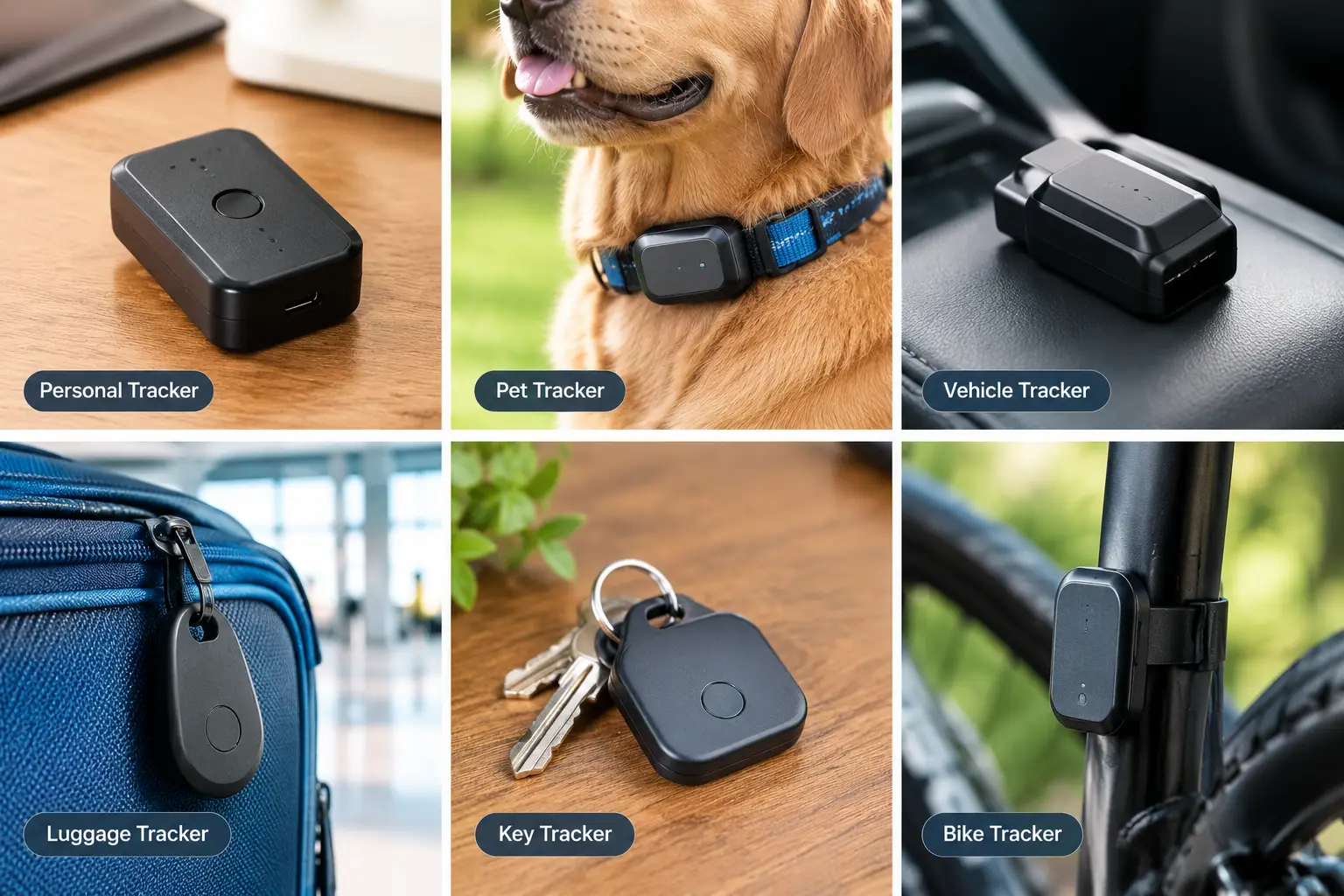
You’ve probably held one without noticing. A friend’s keys jingle, and there it is: a glossy white disc or a little plastic square hanging next to the car fob. So, what do trackers look like? Mostly, they look like nothing special, and that’s exactly the point. Modern item trackers are designed to blend into your everyday stuff, while cellular GPS units are built to ride quietly on vehicles, trailers, and gear.
That design goal cuts both ways. Knowing what a tracker looks like helps you buy the right one for your keys, wallet, luggage, or car. It also helps you recognize one that doesn’t belong to you, which is why this guide covers both sides of the coin (sometimes literally, since several trackers are coin-shaped).
What Do Trackers Look Like, in Short?
Most personal trackers are small, flat objects somewhere between the size of a bottle cap and a credit card: coin-shaped discs, rounded squares with a key-ring hole, slim wallet cards, or matchbox-sized boxes. Bluetooth trackers usually weigh under half an ounce, while cellular GPS trackers are thicker, often magnetic, and roughly the size of a small roll of tape.
Below, we break down seven real trackers you can find on amazon.com in 2026. They range from the redesigned Apple AirTag (2nd Gen), Apple’s first hardware refresh since the original AirTag launched in 2021, to subscription-based GPS pucks built for cars and equipment. Every observation comes from manufacturer spec sheets and aggregated review coverage, not invented “hands-on” stories, so you know exactly where each claim comes from.
Quick note: this post contains affiliate links. If you buy through them, we may earn a commission at no extra cost to you.
Quick Comparison: What Each Tracker Looks Like at a Glance
Before we dig into specs, here’s the visual cheat sheet. If you’re trying to identify an object you just found, the “Shape & look” and “Size” columns are the ones to scan first.
| Tracker | Shape & look | Size (approx.) | How it attaches | Best for |
|---|---|---|---|---|
| Apple AirTag (2nd Gen) | White disc with a polished stainless-steel back | 1.26 in wide × 0.31 in thick | Needs a holder or keyring case | Apple AirTag (2nd Gen): iPhone owners’ keys and bags |
| Samsung Galaxy SmartTag2 | Elongated tag with a large built-in loop | 2.06 × 1.13 × 0.31 in | Loop threads directly onto keys | Samsung Galaxy SmartTag2: Galaxy phone owners |
| Tile Mate (2024) | Rounded square with a key-ring hole | Key-fob size | Built-in hole | Tile Mate (2024): mixed iPhone/Android homes |
| Pebblebee Clip 5 | Rounded rectangle with an LED and clip hole | 1.77 × 1.49 × 0.37 in | Built-in hole, carabiner-friendly | Pebblebee Clip 5: people who switch phones |
| Pebblebee Card 5 | Thin, credit-card-shaped slab | Wallet-card footprint | Slides into a card slot | Pebblebee Card 5: wallets and passports |
| LandAirSea 54 | Black, puck-shaped magnetic disc | 2.275 in wide × 0.945 in tall | Internal magnet | LandAirSea 54: cars, trailers, equipment |
| Tracki 4G GPS Tracker | Matchbox-size box with swappable covers | 1.8 × 1.5 × 0.6 in | Clip, magnet, or Velcro cover | Tracki 4G GPS Tracker: luggage and assets |
Looking at the table, the split is obvious: Bluetooth tags (the first five) are flat, light, and designed to dangle or slide into something, while the two cellular GPS units are chunkier and lean on magnets or mounting covers. The Pebblebee Card 5 is the hardest to spot by eye because it mimics a credit card, whereas the LandAirSea 54 is the shape most people should picture when checking a wheel well. If cross-platform flexibility matters more than looks, the Pebblebee Clip 5 is the one to beat.
💬 One click helps other shoppers make an informed choice too! 😊
Top 7 Trackers for 2026: Expert Analysis
Each pick below covers what the tracker actually looks like, what its specs mean in daily life, who should (and shouldn’t) buy it, and what real buyers report.
1. Apple AirTag (2nd Gen) — longest Precision Finding range
The headline upgrade is reach: Apple’s second-generation Ultra Wideband chip lets Precision Finding guide you from roughly 1.5 times farther away than the original.
If you’ve ever wondered what does an AirTag look like, picture a white disc about the size of a soda bottle cap: 1.26 inches across, 0.31 inch thick, 0.42 ounce, with a polished stainless-steel back you can engrave. Inside sit a user-replaceable CR2032 coin cell, an accelerometer, NFC (so a stranger who finds it can tap it to see your Lost Mode message), and a louder speaker than before. In practice, the longer UWB range shines in big, cluttered places like parking garages and baggage carousels, where the first-gen arrow often gave up. The IP67 rating (1 meter for up to 30 minutes) means rain and a puddle dunk shouldn’t hurt it.
Here’s what to weigh: this is the default pick for iPhone households because Apple’s Find My network is enormous and there’s no subscription. However, it requires iOS 26.2.1 or later, the expanded Precision Finding needs an iPhone 15 or later (excluding the 16e and 17e), and Android phones can’t set it up at all. There’s also no keyring hole, so budget for a holder.
Because the Apple AirTag (2nd Gen) launched in January 2026, review coverage so far centers on the improved finding range and louder chime; long-term durability feedback is still thin, so treat the “more than a year” battery claim as a manufacturer estimate.
Pros:
- ✅ Precision Finding works from much farther away
- ✅ Huge Find My network with no subscription
- ✅ Cheap, swappable CR2032 battery
Cons:
- ❌ Useless for Android phone owners
- ❌ No built-in hole, so accessories cost extra
At around $30 for one or under $100 for a four-pack at the time of writing (check the current price), it’s the strongest value for anyone already on iPhone.
2. Samsung Galaxy SmartTag2 — 500-day battery for Galaxy owners
Samsung redesigned its tag around one practical priority: you’ll rarely think about the battery.
Visually, it’s an elongated tag with a large integrated loop, measuring about 2.06 × 1.13 × 0.31 inches (52.44 × 28.8 × 8.0 mm) and weighing 13.75 grams. That loop is the quiet hero here, because you can thread it straight onto a key ring or bag strap without buying a case. Under the hood, it runs on a replaceable CR2032 rated for up to 500 days, or up to 700 days in Power Saving Mode, and it carries an IP67 rating plus UWB for Compass View directional finding.
Based on comparing the specs, this is excellent for Galaxy owners and pointless for everyone else: full functionality requires a Samsung Galaxy phone or tablet on Android 11 or later and registration in SmartThings Find. If there’s any chance you’ll switch to a Pixel or iPhone, the Pebblebee Clip 5 is the safer bet. Also note that Power Saving Mode stretches battery life by limiting some tracking features.
Reviews consistently praise the battery life and IP67 toughness; the most common complaint is the Samsung-only lock-in, and a minority of owners on Samsung’s own product pages report a defect where the tag drains fresh batteries within days.
Pros:
- ✅ Rated up to 500 days per battery
- ✅ Built-in loop means no extra holder
- ✅ UWB Compass View for close-range finding
Cons:
- ❌ Works only with Samsung Galaxy devices
- ❌ Some owners report rapid battery-drain defects
Usually around $30 or less (prices may vary), the Samsung Galaxy SmartTag2 is a bargain if you’re committed to Galaxy.
3. Tile Mate (2024) — works with any phone
The Mate’s biggest selling point isn’t its shape; it’s that iPhone and Android users in the same house can share one tracking system.
The 2024 Mate is a rounded square (Tile calls the shape a “squircle”) with a built-in key-ring hole and a Life360 logo on its button. Life360 lists up to 350 feet of Bluetooth range, an IP68 water-resistance rating, a 100dB+ ring, and an up-to-three-year battery that is sealed, not replaceable. On paper, that sealed battery means zero maintenance for years, then a full replacement. The button also doubles as an SOS trigger that can alert your Life360 Circle.
This is the pick for families already using Life360 or households split between iOS and Android. What most buyers overlook is that Tile runs its own network rather than Apple’s Find My or Google’s Find Hub, so lost-item coverage depends on fewer phones, and the best features (Smart Alerts, item reimbursement) sit behind a paid plan. Security researchers at Georgia Tech have also raised concerns about how Tile devices broadcast identifying data.
In aggregated review coverage, Android Police found real-world range fell short of the claimed 350 feet (closer to 300) but praised the louder chime and long battery life; a recurring complaint is needing subscriptions to unlock everything.
Pros:
- ✅ Works with both iPhone and Android
- ✅ Built-in hole and IP68 rating
- ✅ SOS button for Life360 families
Cons:
- ❌ Non-replaceable battery means replacing the whole tracker
- ❌ Smaller network than Apple or Google
Around $25 each at the time of writing, the Tile Mate (2024) is affordable, but factor in a possible subscription.
4. Pebblebee Clip 5 — rechargeable, iPhone or Android
The Clip 5 solves the “which phone will I have next year?” problem.
It’s a rounded rectangle measuring 1.77 × 1.49 × 0.37 inches and weighing just 10 grams, with a bright LED and a hole for keys or a carabiner. It pairs with either Apple Find My or Google’s Find Hub (you choose one at setup, not both at once), charges over USB-C, and lasts up to 12 months per charge. Bluetooth range is rated up to 500 feet, and rapid button presses trigger an Alert mode with a siren, flashing lights, and location sharing with a Safety Circle. In practice, that LED is genuinely helpful when keys slip under a car seat at night.
This is our honest pick for phone switchers, split-platform families, and students or travelers who’d value the safety alert. One nuance: the IP66 rating handles rain and splashes, but unlike IP67 trackers, it isn’t rated for submersion.
We couldn’t verify a large, consistent body of owner reviews for the Clip 5 specifically. Coverage of the earlier Clip Universal generally praised its loudness and cross-platform flexibility, so treat long-term reliability as promising but unproven.
Pros:
- ✅ Works with Apple Find My or Google Find Hub
- ✅ USB-C recharge ends coin-cell hunting
- ✅ LED and siren make close-range finding easy
Cons:
- ❌ IP66 isn’t rated for full submersion
- ❌ Live alert sharing requires an optional upgrade
Typically in the $30 to $40 range (check the current price), the Pebblebee Clip 5 is the best-value cross-platform tag.
5. Pebblebee Card 5 — disappears into a wallet
If you want to know what a tracker looks like when it doesn’t want to look like a tracker, this is it.
The Pebblebee Card 5 is a thin, credit-card-shaped slab built for wallets, passport holders, and laptop sleeves. Like the Clip, it works with Apple Find My or Google’s Find Hub. It uses a wireless-rechargeable battery rated for up to 18 months per charge, though the charger isn’t included, so you’ll need a Qi-style pad. In practice, wireless charging means no open port to collect pocket lint, while the 18-month rating means you’ll recharge roughly once a year and a half.
This is the right shape if your wallet, not your keys, is what goes missing. A coin-style tracker creates a lump in a bifold; a card slides into a slot. That said, card trackers are still thicker than a real credit card, so check the listing’s thickness against a minimalist wallet before buying.
Independent long-term reviews are limited. Reviews on Pebblebee’s own site report that Find My tracking works as expected, but we’d call durability unverified for now.
Pros:
- ✅ Wallet-friendly card shape stays invisible
- ✅ Up to 18 months per charge
- ✅ Cross-platform: Find My or Find Hub
Cons:
- ❌ Wireless charger not included in the box
- ❌ Limited independent long-term review data
Usually in the $30 to $45 range at the time of writing, it’s fair value for anyone who’s lost a wallet even once.
6. LandAirSea 54 — magnetic GPS puck for vehicles
This is what most people picture when they ask what does a GPS tracker look like, and for good reason.
The LandAirSea 54 is a black puck 2.275 inches across and 0.945 inch tall, about the size of a small roll of tape, with a strong internal magnet. It combines GPS with 4G LTE, sends updates as often as every 3 seconds, and runs on a 1,500 mAh rechargeable battery that LandAirSea rates for 1 to 3 weeks on frequent updates or up to 6 months in Low Power Mode. It’s IP67-rated, sleeps when motionless, and offers geofence and speed alerts in its SilverCloud app. Practically, that means live location anywhere with cell coverage, no crowd network required, but you’ll pull it off the car to recharge every week or two.
It’s built for your own vehicles, trailers, boats, and equipment, or for a fleet. Placing it on a car you don’t own or share is a legal minefield (see our safety section below).
Reviews consistently praise the magnet strength and weatherproofing; the main complaint is that monthly subscription fees, which third-party reviews list at roughly $20 to $50, quickly outweigh the low device price.
Pros:
- ✅ True real-time tracking over cellular networks
- ✅ Strong built-in magnet, no wiring
- ✅ IP67 weatherproof housing
Cons:
- ❌ Subscription required for any tracking
- ❌ Frequent updates drain the battery fast
The device is typically under $50 (plus a required plan), so judge value on the yearly subscription cost, not the sticker.
7. Tracki 4G GPS Tracker — smallest swappable GPS box
Tracki fits real-time cellular GPS into something smaller than a matchbox.
The Tracki 4G GPS Tracker measures about 1.8 × 1.5 × 0.6 inches and weighs 1.26 ounces. It ships with interchangeable back covers (belt clip, magnet, and Velcro) plus a silicone water-resistant sleeve and lanyard. It uses 4G LTE with 3G/2G fallback, GPS, and Wi-Fi/Bluetooth for indoor positioning, with a worldwide SIM included and a replaceable battery. Here’s the catch the spec sheet spells out: at 1 to 5 updates per minute, the battery lasts only 2 to 3 days, stretching to about a month in battery-save mode.
It suits international luggage, backpacks, and equipment where size matters more than battery life. It’s not waterproof without its cover, and if you’re considering it for a person, consent and state law come first.
Reviews are mixed: buyers like the tiny size and low plan prices (Tracki lists plans from about $10 to $20 a month), but a recurring complaint is location drift, especially indoors where it falls back on Wi-Fi or cell-tower positioning.
Pros:
- ✅ Smallest real-time GPS in this lineup
- ✅ Three mounting covers included in the box
- ✅ Global SIM works across many countries
Cons:
- ❌ Short battery life at real-time update rates
- ❌ Indoor accuracy draws frequent complaints
The device usually sells for under $40 plus a monthly plan, which is fair value for travelers who need worldwide coverage.
Side-by-Side Specs: The Top 7 Compared
| Tracker | Network | Battery | Water rating | Subscription | Price range | Best for |
|---|---|---|---|---|---|---|
| Apple AirTag (2nd Gen) | Apple Find My | CR2032, 1+ year | IP67 | No | Around $30 | Apple AirTag (2nd Gen): iPhone users |
| Samsung Galaxy SmartTag2 | SmartThings Find | CR2032, up to 500 days | IP67 | No | Around $30 | Samsung Galaxy SmartTag2: Galaxy users |
| Tile Mate (2024) | Tile / Life360 | Sealed, up to 3 years | IP68 | Optional | Around $25 | Tile Mate (2024): mixed households |
| Pebblebee Clip 5 | Find My or Find Hub | USB-C, up to 12 months | IP66 | Optional | $30–$40 | Pebblebee Clip 5: phone switchers |
| Pebblebee Card 5 | Find My or Find Hub | Wireless, up to 18 months | See listing | Optional | $30–$45 | Pebblebee Card 5: wallets |
| LandAirSea 54 | GPS + 4G LTE | 1,500 mAh, 1–3 weeks | IP67 | Required | Under $50 + plan | LandAirSea 54: vehicles |
| Tracki 4G GPS Tracker | GPS + 4G LTE + Wi-Fi | Replaceable, days to ~1 month | Resistant with cover | Required | Under $40 + plan | Tracki 4G GPS Tracker: luggage |
The pattern is clear: Bluetooth tags win on battery life and zero monthly cost, while the LandAirSea 54 and Tracki 4G GPS Tracker win on real-time accuracy anywhere with cell service. Among Bluetooth options, ecosystem matters more than specs, so iPhone users should start with the Apple AirTag (2nd Gen), Galaxy users with the Samsung Galaxy SmartTag2, and everyone else with the Pebblebee Clip 5.
✨ Don’t miss these top-rated tracker picks!
🔍 Take your peace of mind to the next level with this carefully curated lineup. Click a highlighted tracker to check current pricing and availability. These picks will help you find your keys, wallet, and car in seconds, every single time!
How to Set Up Your Tracker Right: The First 30 Days
Buying the tracker is the easy part. The first month is when small setup choices decide whether it actually saves you later. Here’s a practical routine that works for any Bluetooth tracker in this guide.
- Pair it at home, not in the car. Pairing takes under a minute, but do it where you can test the chime. If you can’t hear it from the next room, that’s useful to know before you need it.
- Name it like you’ll search for it in a panic. “Blue backpack” beats “Tracker 2.” When something’s lost, you won’t remember which tag is which.
- Turn on separation alerts. Apple, Samsung, and Pebblebee apps can warn you when you leave an item behind. This single setting prevents more losses than any range spec.
- Test Lost Mode once. Enter your contact info so anyone who finds the item (and taps an NFC-enabled tag like the Apple AirTag (2nd Gen)) can reach you.
- Mark your calendar for battery checks. Coin-cell tags like the Samsung Galaxy SmartTag2 last many months, but rechargeables like the Pebblebee Clip 5 need a charge roughly yearly. Set a reminder so it never dies quietly.
Battery Safety With Kids at Home ⚠️
If you have young children, treat spare CR2032 cells like medication. Under Reese’s Law, the CPSC adopted a mandatory safety standard for button cell and coin batteries because a swallowed coin cell can cause severe injury fast. Swap batteries out of kids’ reach, and dispose of old cells right away. Rechargeable trackers sidestep this risk entirely, which is one more quiet advantage of the Pebblebee lineup.
Common first-month mistake: attaching a tag to a dog collar or a kid’s backpack and assuming it’s a live GPS. Bluetooth trackers update only when a network phone passes nearby, so expect delays, not real-time dots.
Which Tracker Fits Your Life? 3 Real-World Scenarios
Specs only matter in context. So instead of another list, here are three common buyer profiles matched to the trackers that make sense for them.
🎓 The College Commuter on a Budget
Picture a student riding the bus 8 miles each way, carrying a backpack, keys, and a wallet, with about $75 to spend. If they use an iPhone, a two-pack of the Apple AirTag (2nd Gen) plus a cheap keyring holder covers keys and backpack with no monthly fee. An Android user should look at the Pebblebee Clip 5, because its Alert mode (siren, flashing lights, location sharing) adds a safety layer for late-night walks across campus. Either way, skip GPS subscriptions: dense campuses are packed with phones, so crowd-network finding works well.
✈️ The Frequent Flyer
Someone flying 10 or more times a year mostly worries about checked bags and a passport wallet. A Pebblebee Card 5 in the passport holder and an Apple AirTag (2nd Gen) or Pebblebee Clip 5 inside the suitcase lining is the sweet spot. For international trips to places where Find My or Find Hub coverage is thinner, the Tracki 4G GPS Tracker with a short-term plan adds true worldwide tracking, although its battery life means charging it the night before departure.
🚚 The Small-Business Owner With a Trailer
A landscaper with one work truck and a $15,000 equipment trailer needs live location, theft alerts, and geofencing. Here, the LandAirSea 54 earns its subscription: its magnet mounts to the trailer frame in seconds, motion-activated sleep stretches the battery, and geofence alerts flag after-hours movement. A Tile Mate (2024) in the truck cab adds a cheap backup for the keys. Budget-wise, expect the GPS plan to cost more per year than the hardware, which is still trivial compared to an uninsured trailer loss.
How to Spot a Hidden Tracker on Your Car or Belongings
For many readers, “what do trackers look like” isn’t a shopping question; it’s a safety question. Here are the most common situations and what to do about each.
Problem 1: Your phone shows an unknown tracker alert
Solution: Take it seriously, but don’t panic. Since 2024, iPhones and Android phones share an industry specification called Detecting Unwanted Location Trackers, and Apple and Google announced cross-platform alerts that flag a compatible Bluetooth tracker moving with you. Tap the alert, play a sound on the tracker, and look for a disc, square, or card shape matching our quick comparison table.
Problem 2: You suspect a hidden tracker on car parts you can’t easily see
Solution: Cellular GPS trackers like the LandAirSea 54 don’t use the Bluetooth alert system, so your phone may never warn you. Do a physical sweep with a flashlight. Check wheel wells, under the bumpers, beneath the seats, inside the trunk’s spare-tire area, and the OBD-II port under the dashboard. A hidden tracker on car frames is usually a black puck or box clinging to metal by a magnet, so run your hand along flat steel surfaces.
Problem 3: Something is in your bag, but there’s no alert
Solution: Look for anything flat, coin-shaped, or card-shaped that you didn’t put there, including inside lining seams. Older or non-compliant trackers may not trigger alerts.
Problem 4: You found one. Now what?
Solution: If you feel unsafe, contact local law enforcement or a domestic violence advocate before disabling it, since the device can be evidence. Photograph it in place first.
How to Choose the Right Tracker: 7 Steps
Choosing a tracker comes down to seven questions, answered in order. Skip one, and you’ll likely buy the wrong shape or the wrong network.
- Start with your phone. Ecosystem lock-in is the biggest dealbreaker. iPhone users get the most from the Apple AirTag (2nd Gen), Galaxy users from the Samsung Galaxy SmartTag2, and switchers from the Pebblebee Clip 5.
- Decide between “find nearby” and “track live.” Bluetooth tags help you find lost items. Only cellular GPS units like the LandAirSea 54 show real-time movement, and they cost monthly.
- Match the shape to the item. Coins and squares suit keys and bags; cards suit wallets; magnetic pucks suit vehicles. This is why knowing what trackers look like matters before you buy.
- Check the water rating. IP67 and IP68 survive brief submersion; IP66 handles rain. Bikes and boat keys need the higher ratings.
- Pick a battery style. Replaceable coin cells are cheap and quick to swap; rechargeables avoid waste; sealed batteries, like the one in the Tile Mate (2024), mean replacing the whole tracker every few years.
- Estimate the three-year cost. Add subscriptions, batteries, and holders. A “cheap” GPS tracker can cost several hundred dollars over three years.
- Consider safety extras. SOS and alert features on the Pebblebee Clip 5 and Tile Mate (2024) add real value for students, solo travelers, and older relatives.
Bluetooth Trackers vs GPS Trackers: What’s the Real Difference?
The two families look different because they work differently. A Bluetooth tracker is basically a tiny beacon. It doesn’t know where it is; instead, it whispers an anonymous ID, and any nearby phone on the same network (Apple Find My, Google’s Find Hub, SmartThings Find, or Tile) reports the location. That’s why these tags can run for a year or more on a coin cell and stay so small.
A GPS tracker, by contrast, calculates its own position from satellites and sends it over a cellular modem. That extra hardware explains the bigger, puck-like body of the LandAirSea 54 and the boxy Tracki 4G GPS Tracker, along with their rechargeable batteries and monthly fees. So, what does a GPS tracker look like compared to a tag? Thicker, heavier, usually black, and often magnetic.
| Feature | Bluetooth tracker | Cellular GPS tracker | Phone location sharing |
|---|---|---|---|
| Typical look | Coin, square, or card | Black puck or box | Your phone |
| Live tracking | No, updates when phones pass | Yes, seconds to minutes | Yes |
| Battery | Months to years | Days to weeks | Daily charge |
| Monthly cost | Usually none | Required | None |
| Best for | Keys, bags, wallets: Apple AirTag (2nd Gen) | Vehicles, assets: LandAirSea 54 | People who consent |
The table shows why most households need a Bluetooth tag, not GPS. Unless you need live movement for a vehicle or high-value equipment, the subscription and charging routine of a GPS unit rarely pays off. Phone-based location sharing remains the most transparent option for tracking family members who agree to it.
Safety, Laws, and Standards You Should Know
Trackers are legal to buy and use on your own property everywhere in the US. Using them on other people is where things get serious.
Consent and State Laws
Many states have laws that specifically restrict placing a tracking device on a vehicle you don’t own or on a person without consent, and stalking laws can apply even where a specific tracking statute doesn’t. Rules vary by state, and exceptions (such as a parent and a minor’s car the parent owns) differ too, so check your state’s statutes or ask an attorney before tracking anything you share with someone else. We’re not lawyers, and this isn’t legal advice.
Tech-Enabled Abuse
Physical trackers are only one tool. If you suspect someone is monitoring you, also review the FTC’s guidance on stalking apps and what to do about them, which explains warning signs and suggests contacting advocates from a device the abuser can’t access.
Built-In Anti-Stalking Features
The Bluetooth trackers in this guide support unknown-tracker alerts on iPhone and Android, and several play a sound when separated from their owner for a while. That makes them poor stalking tools by design, which is a good thing. Cellular GPS trackers don’t have these protections, so manufacturers like Tracki state compliance with federal and state tracking laws and place the legal burden on the buyer.
Product Standards
Look for FCC compliance markings on any wireless device sold in the US, and IP ratings verified under IEC 60529 for water claims.
Features That Actually Matter (and Ones That Don’t)
Marketing pages love big numbers. Here’s how to read them.
- ✅ Network size matters most. A tag is only as good as the phones around it. That’s why the Apple AirTag (2nd Gen) and Find Hub-compatible Pebblebee Clip 5 outperform tags on smaller networks once an item leaves your sight.
- ✅ Directional finding (UWB) is a real upgrade. An on-screen arrow beats “it’s somewhere in this room” every time.
- ✅ Speaker volume matters under couch cushions and in crowded bags.
- ❌ Maximum Bluetooth range is overrated. A 500-foot rating assumes open air; walls cut it dramatically, as Tile Mate testing showed.
- ❌ “Unlimited range” claims on GPS trackers really mean “anywhere with cell coverage.” Remote cabins and parking garages can still go dark.
Long-Term Cost and Maintenance
The sticker price is the smallest part of owning a GPS tracker, and the biggest part of owning a Bluetooth tag.
| Tracker | Device (approx.) | Ongoing cost | Estimated 3-year total |
|---|---|---|---|
| Apple AirTag (2nd Gen) | Around $30 | A few coin cells | Under $45 |
| Pebblebee Clip 5 | $30–$40 | Electricity only | Under $45 |
| Tile Mate (2024) | Around $25 | Optional plan, replacement at ~3 years | $25 to $150+ |
| LandAirSea 54 | Under $50 | Roughly $20–$50 per month | Roughly $750 to $1,850 |
The math is blunt: three years of a GPS plan can cost 20 to 40 times more than a Bluetooth tag. That’s money well spent on a work trailer, but overkill for house keys. Maintenance stays simple across the board: wipe tags dry after rain, check battery levels quarterly, and recharge GPS units on a fixed weekly schedule.
Common Mistakes to Avoid When Buying a Tracker
- Buying for the wrong phone. An AirTag won’t pair with a Galaxy phone, and the Samsung Galaxy SmartTag2 won’t pair with an iPhone.
- Expecting live tracking from a Bluetooth tag. It reports location only when a network device passes by.
- Ignoring the subscription. Always price a GPS plan before buying the hardware.
- Forgetting accessories. Disc trackers need holders; card trackers may need a wireless charger.
- Using a tracker on someone without consent. Beyond ethics, it can be a crime in many states.
Frequently Asked Questions About Trackers
❓ What does an OBD-II GPS tracker look like?
❓ Can I use an AirTag with an Android phone?
❓ What's the best tracker for a dog or cat?
❓ Is it legal to put a tracker on my teenager's car?
❓ Are tracker 4-packs worth buying?
Conclusion: Now You Know What Trackers Look Like
So, what do trackers look like? In 2026, they come in four main shapes: discs like the Apple AirTag (2nd Gen), keychain tags like the Samsung Galaxy SmartTag2, Tile Mate (2024), and Pebblebee Clip 5, slim cards like the Pebblebee Card 5, and magnetic GPS pucks or boxes like the LandAirSea 54 and Tracki 4G GPS Tracker.
For most people, the decision is simpler than it seems. Pick the Bluetooth tag that matches your phone, and you’ll get years of low-cost peace of mind. Reach for a GPS tracker only when you need live location for a vehicle, trailer, or valuable gear, and budget for the subscription before you buy.
Just as important, recognizing these shapes protects you. If you ever get an unknown tracker alert, or you want to check for a hidden tracker on car frames or inside a bag, you now know exactly what to look for and where to look. That knowledge is worth more than any spec sheet.
Whichever you choose, set it up properly in the first week, turn on separation alerts, and keep spare batteries away from kids.
🚀 Ready to stop losing your stuff for good?
🛒 Click any highlighted tracker above to check current pricing and availability on Amazon. One small tag today could save you hours of searching tomorrow!
Recommended for You
- Small Dog Shock Collar With Remote: 7 Smartest, Safest Picks (2026)
- Underground Electric Fence Wire for Dogs: 7 Smart Picks (2026)
- Above Ground Invisible Fence: 7 Best No-Dig Picks That Work (2026)
Disclaimer: This post contains affiliate links. As an Amazon Associate, I earn from qualifying purchases made through these links, at no additional cost to you.
✨ Found this article helpful? Share it with someone who needs it! 💬🤗